As a follow up on my previous blog, I did some improvement on the technique I described of taking passport photos at home. There were two problems with the photos in the previous article. First the resolution was low, and second the background was not quite white due to shadow in the background. To fix the first problem, I made the following modification: Instead of scaling down the image as I described before, re-size the print size of the image. The new image print size should be reduced until the dimension from the bottom of the chin to the top of the head is about 1.05 inch. The rest of the steps are the same.
As for the background problem, make sure that the person stands about one to two foot away from the wall to avoid any shadows.
After the pictures are arranged on a 7x5 inch page, use the image adjustment tools to adjust the colors as needed. For example you can lighten the background to make it closer to white than the original photo by using the Curves tool.
The resulting photo should be much better than what I described before. Try it.
Tuesday, May 05, 2009

Sunday, April 05, 2009
Passport Photos at Home
You can take your own passport photos at home and print them at any photo print shop such as Walmart or Sam's Club. Refer to the photo guidelines in your country. In the US the passport photo needs to be 2"x2" with the face looking straight at the camera with a white background, and the distance between the chin and top of head needs to be between 1 to 1.3 inch. Here is how you can take your own passport photos at home:
First make the person stand in front of a white wall, and have two lamps shining at the face as shown in the picture below. Make sure that no shadows show on the white wall and that the lighting is adequate.
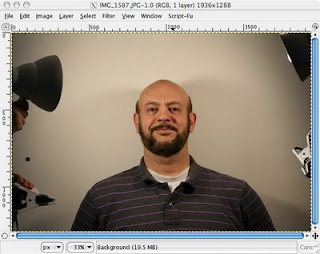
Then open the picture in a program like PhotoShop or the free Gimp software (www.gimp.com). In PhotoShop or Gimp measure the distance between the chin to the top of the head with the measuring tool. In my case the distance in inches was about 7". In order to scale this distance down to about 1.1" I scaled the image by a factor of about 1/7. The new scaled image in shown in the picture below. When I measured the distance between the chin to the top of the head I read about 1.1". Perfect!
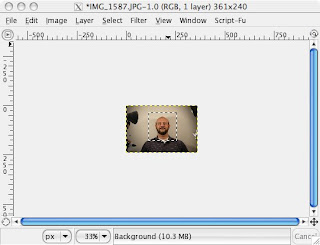
Now select a window of exactly 2"x2" with the select tool as shown in the picture above, and copy into a new frame that has the dimensions 7"x5" which is the size of the picture you will print at the print shop. Make an array of that cropped photo in the 7"x5" frame as shown in the picture below.
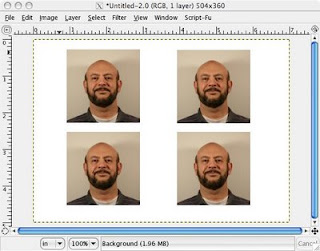
Finally print that picture in a print shop such as Walmart or Sam's Club using a 7"x5" size prints and you will get four passport size photos in each print. The photo dimensions will be exactly 2"x2" and the distance between the chin to the top of the head will be about 1.1". All you have to do after that is cut the four photos in each print and there you have them, cheap and clean.
First make the person stand in front of a white wall, and have two lamps shining at the face as shown in the picture below. Make sure that no shadows show on the white wall and that the lighting is adequate.

Then open the picture in a program like PhotoShop or the free Gimp software (www.gimp.com). In PhotoShop or Gimp measure the distance between the chin to the top of the head with the measuring tool. In my case the distance in inches was about 7". In order to scale this distance down to about 1.1" I scaled the image by a factor of about 1/7. The new scaled image in shown in the picture below. When I measured the distance between the chin to the top of the head I read about 1.1". Perfect!

Now select a window of exactly 2"x2" with the select tool as shown in the picture above, and copy into a new frame that has the dimensions 7"x5" which is the size of the picture you will print at the print shop. Make an array of that cropped photo in the 7"x5" frame as shown in the picture below.

Finally print that picture in a print shop such as Walmart or Sam's Club using a 7"x5" size prints and you will get four passport size photos in each print. The photo dimensions will be exactly 2"x2" and the distance between the chin to the top of the head will be about 1.1". All you have to do after that is cut the four photos in each print and there you have them, cheap and clean.
Tuesday, March 24, 2009
Mobility
There was a time when high quality audio systems were big, I mean big in size: High power audio amplifier to reproduce the sound transients with high fidelity, large speakers with deep woofers to better generate the bass notes, an equalizer to compensate for any distorted frequency components, and of course a low noise receiver for high fidelity reception of the FM radio waves. The whole system occupied a good portion of any room and you had to strategically sit in front of the speakers to receive the best sound waves for a pleasant stereo experience. That was up to the late eighties maybe, but since then audio systems have been shrinking in size and quality. Today it seems that the speaker has disappeared altogether and is replaced by the earphones. A teenager nowadays would often share his/her earphone with a peer to listen to the same iPod, and what kind of sound quality would you expect with the earphone in one of your ears and the other half of it in someone else's ear? It seems that quality is no longer important, and has been replaced by style or trend, it has been replaced by mobility.
Same goes for high quality video, now replaced with mobile tiny screen devices, telephones replaced with cell phones, and nice desktop stations replaced with tiny little laptops. It is the age of mobility, the world has become a small village, and it does not matter where you are anymore, everything is mobile, and this is the trait of this century. Is this better than how things used to be? There is definitely an advantage of being mobile, but to lose quality for the sake of mobility seems to be a drawback. Don't you agree?
Same goes for high quality video, now replaced with mobile tiny screen devices, telephones replaced with cell phones, and nice desktop stations replaced with tiny little laptops. It is the age of mobility, the world has become a small village, and it does not matter where you are anymore, everything is mobile, and this is the trait of this century. Is this better than how things used to be? There is definitely an advantage of being mobile, but to lose quality for the sake of mobility seems to be a drawback. Don't you agree?
Sunday, February 22, 2009
Automatic Blood Pressure Monitors
You might have thought of owning one of those automatic blood pressure monitors to conveniently take readings of your blood pressure at home. It is nice to have such a device at home so that you don't have to wait till you see your doctor just to know what your blood pressure is. That is why I bought one of those small compact automatic monitors. The one I bought was a generic, relatively cheap monitor ($50 or so), and it is easy to use. Just wrap the cuff around your arm, press the button and it pumps air into the cuff and displays your diastolic and systolic pressures on the LCD screen.
I used my monitor for over a year and was happy to see my blood pressure close to 120/80. However, I was not sure how accurate those readings were, especially when I found discrepancies between the readings I got at home and readings I got elsewhere. I am not talking big discrepancies, only a few points. I wanted to know how accurate were the readings I took at home, because although I knew that blood pressure varied all over the place within minutes, I also knew that there was a big difference between 126/76 and say 134/84. All I wanted to know was the accuracy window of my monitor. I surfed the internet looking for how accurate those monitors were but I did not find the information I was looking for. I found warnings about the necessity of calibrating the monitor periodically to ensure accurate readings, but of course you couldn't calibrate it yourself, you had to send it to a special lab to do that for you, for a fee of course. I was frustrated about all this, and was coming to the conclusion that the only accurate blood pressure reading was the manual one where the nurse had to listen to the turbulence in your blood with a stethoscope while pumping air into the cuff.
Lately, I found a brand called Omron that had a reputation of being accurate, so I bought one the other day. The specifications sheet inside the box said it was calibrated to be accurate within 2% of the actual pressure. Now that was impressive. I tried it instantly, and I got a reading of 126/76 the first time I used it. Within minutes, I used my old generic monitor to compare the two, and I got a reading of 134/84. OK, so which one could I believe now. Then after a few more attempts, it occurred to me that in order to have a fair comparison I had to have the same position in both measurements. Reading the booklet that came with the Omron monitor it said to sit on a chair and lay your arm on a table so that it was about the same level as your heart, and to keep your feet flat on the floor. So I sat in that position and used my old monitor again. I got a reading of 127/76. Then I used the Omron monitor in that same setting and I got 126/76! Bingo! Almost exactly the same reading. I made two more measurements with each monitor in that position and I got similar readings again. I was thrilled. This meant that what was important was the position in which you measured your blood pressure not the monitor itself. It seemed that both monitors read the same pressure when the conditions were similar. To make sure that was the case I tried both monitors again the next morning, and again I got very similar readings. So I returned the new expensive Omron monitor and decided to continue using my old one. All I had to do was to make sure that each time I used it I sat in that position on the table, laying my arm at the same level as my heart, and keeping my feet flat on the floor. That position always gave a consistent accurate measurement of my blood pressure.
So now I know that I have a means of telling within reasonable accuracy what my blood pressure is at the convenience of my home.
I used my monitor for over a year and was happy to see my blood pressure close to 120/80. However, I was not sure how accurate those readings were, especially when I found discrepancies between the readings I got at home and readings I got elsewhere. I am not talking big discrepancies, only a few points. I wanted to know how accurate were the readings I took at home, because although I knew that blood pressure varied all over the place within minutes, I also knew that there was a big difference between 126/76 and say 134/84. All I wanted to know was the accuracy window of my monitor. I surfed the internet looking for how accurate those monitors were but I did not find the information I was looking for. I found warnings about the necessity of calibrating the monitor periodically to ensure accurate readings, but of course you couldn't calibrate it yourself, you had to send it to a special lab to do that for you, for a fee of course. I was frustrated about all this, and was coming to the conclusion that the only accurate blood pressure reading was the manual one where the nurse had to listen to the turbulence in your blood with a stethoscope while pumping air into the cuff.
Lately, I found a brand called Omron that had a reputation of being accurate, so I bought one the other day. The specifications sheet inside the box said it was calibrated to be accurate within 2% of the actual pressure. Now that was impressive. I tried it instantly, and I got a reading of 126/76 the first time I used it. Within minutes, I used my old generic monitor to compare the two, and I got a reading of 134/84. OK, so which one could I believe now. Then after a few more attempts, it occurred to me that in order to have a fair comparison I had to have the same position in both measurements. Reading the booklet that came with the Omron monitor it said to sit on a chair and lay your arm on a table so that it was about the same level as your heart, and to keep your feet flat on the floor. So I sat in that position and used my old monitor again. I got a reading of 127/76. Then I used the Omron monitor in that same setting and I got 126/76! Bingo! Almost exactly the same reading. I made two more measurements with each monitor in that position and I got similar readings again. I was thrilled. This meant that what was important was the position in which you measured your blood pressure not the monitor itself. It seemed that both monitors read the same pressure when the conditions were similar. To make sure that was the case I tried both monitors again the next morning, and again I got very similar readings. So I returned the new expensive Omron monitor and decided to continue using my old one. All I had to do was to make sure that each time I used it I sat in that position on the table, laying my arm at the same level as my heart, and keeping my feet flat on the floor. That position always gave a consistent accurate measurement of my blood pressure.
So now I know that I have a means of telling within reasonable accuracy what my blood pressure is at the convenience of my home.
Sunday, February 08, 2009
Home Gym
Here is my experience with home gym equipment. I don't have time to join a gym for regular exercise so I made my own home gym. I equipped my basement with free weights, which consist of a barbell and dumbells with 200 pounds of various size plates, together with a good bench. The bench is sturdy enough to take 300 pounds of weights and has multiple settings for flat, incline and decline positions. For cardio routines I bought a good quality treadmill and an elliptical machine that emulates staircase climbing but the foot actually never leaves the paddle to eliminate any impact on knees or ankle joints.
I have tried some supplements advertised in the market that promised more energy and fast recovery after intensive exercises. First I took Hydroxycut and then N.O. XPLODE, and have decided not to use them anymore because they were not as effective as adverstised and they had side effects. Main side effect for me was the caffeine (more than 200 mg in each serving). Another side effect was stomach cramps when doing situps. I also tried Creatine and found that it caused me bloating probably due to liquid retention in the body. So I stopped that too. The only thing I take now is whey protein only after the exercise. I haven't found any side effects for whey protein so far.
The best exercises I found are: squats, deadlifts and bench presses of various kinds. In addition to that I add some isolation routines like curls and leg extensions.
I also like pushups, situps and pullups. Pushups don't need any equipment, although I found that the so called "Perfect Pushups" help provide more challenging pushups than the bare ones.
The pullup door bar that is advertised in TV works great and can be found at Walmart for less than $30. It is great for the lats, chest and shoulders, as well as the abs.
Usually each exercise takes no more than 45 minutes, and when done every other day it provides a great means to stay active making up for the sedentary office daily rouitne.
In short, I don't need to waste time going to a gym when I can do fine at home. Of course this might not work for a professional bodybuilder, but it works fine for a family man with a busy schedule like me. Don't you agree?
I have tried some supplements advertised in the market that promised more energy and fast recovery after intensive exercises. First I took Hydroxycut and then N.O. XPLODE, and have decided not to use them anymore because they were not as effective as adverstised and they had side effects. Main side effect for me was the caffeine (more than 200 mg in each serving). Another side effect was stomach cramps when doing situps. I also tried Creatine and found that it caused me bloating probably due to liquid retention in the body. So I stopped that too. The only thing I take now is whey protein only after the exercise. I haven't found any side effects for whey protein so far.
The best exercises I found are: squats, deadlifts and bench presses of various kinds. In addition to that I add some isolation routines like curls and leg extensions.
I also like pushups, situps and pullups. Pushups don't need any equipment, although I found that the so called "Perfect Pushups" help provide more challenging pushups than the bare ones.
The pullup door bar that is advertised in TV works great and can be found at Walmart for less than $30. It is great for the lats, chest and shoulders, as well as the abs.
Usually each exercise takes no more than 45 minutes, and when done every other day it provides a great means to stay active making up for the sedentary office daily rouitne.
In short, I don't need to waste time going to a gym when I can do fine at home. Of course this might not work for a professional bodybuilder, but it works fine for a family man with a busy schedule like me. Don't you agree?
Saturday, December 27, 2008
Exploring the VHF Radio World
Since heavy ice broke my HF antenna pole last year I have been without any HF communications, being too lazy to repair the pole or replace it. I never used the VHF bands before, so I thought now is a good time to experiment with those bands especially that it is easy to install a small indoor antenna to cover the two bands: 2 m (144 MHz) and 70 cm (430 MHz). The antenna cost about $30 and can be installed on the top of a car using a magnet base. For now I intend to use it indoor only. The gain and VSWR of the antenna are probably not that good but I am hoping that I can communicate using one of the nearby repeaters in the city, and for that I don't need a lot of power or antenna gain.
The main advantage of using VHF bands is the ability to experiment with digital communications, such as RTTY, slow scan TV and ARPS systems. Some amateurs also use VHF bands for moon and meteor scatter, but that is not one of my immediate interests now.
In order to utilize any of the digital modes a TNC (Terminal Node Controller) is needed, or at least that used to be the case. Now a sound card of a common personal computer can be used instead of the TNC to connect with the radio, together with some special software installed in the PC, and the PC itself can then be used to operate the radio in digital mode. Well, I got a collection of digital mode communications software recently and it is time now to use them in the VHF bands.
Before the internet and email, radio amateurs used the digital modes to send text messages just like email. Now of course email is much more efficient, except of course when there is no access to the internet.
In any case, pretty soon I should be able to use the VHF bands and report on my findings. Wish me luck.
The main advantage of using VHF bands is the ability to experiment with digital communications, such as RTTY, slow scan TV and ARPS systems. Some amateurs also use VHF bands for moon and meteor scatter, but that is not one of my immediate interests now.
In order to utilize any of the digital modes a TNC (Terminal Node Controller) is needed, or at least that used to be the case. Now a sound card of a common personal computer can be used instead of the TNC to connect with the radio, together with some special software installed in the PC, and the PC itself can then be used to operate the radio in digital mode. Well, I got a collection of digital mode communications software recently and it is time now to use them in the VHF bands.
Before the internet and email, radio amateurs used the digital modes to send text messages just like email. Now of course email is much more efficient, except of course when there is no access to the internet.
In any case, pretty soon I should be able to use the VHF bands and report on my findings. Wish me luck.
Sunday, December 14, 2008
Winter Workout
The winter here in Iowa is cold and snowy, with winds that can exceed 30 mph at times making the temperature feels like below zero F. In a weather like this one cannot go out to do anything, let alone exercise. But how can one stay in shape in a winter like this? I don't know about you but with the kind of stress I have at work I need to exercise regularly or else I can't keep up with life's pressing demands. So I do weight training in the basement. I found out that it is the best kind of workout I can do to stay in shape. Not only it helps the muscles and ligaments stay strong and flexible but it also provides aerobic benefits as a bonus. I do run on the treadmill once in a while, but I found out that the weight training alone is sufficient. There are a few things to bear in mind while weight training to get good benefit and see positive results: First you must warm up a few minutes before you start the exercise. Second you must use enough weights to push your muscles to the point of near exhaustion. This means that you won't be able to make many repetitions. A set of three-eight or even six repetitions each is enough. You must increase the weighs when you feel that your muscles can do more. Usually 10% increase each time is adequate.
Third, you must rest one day after each workout to let the muscles recover. This is important because the soreness your muscles feel are the result of micro-tear in them, and it is important to have enough nutrition and rest to let the muscles repair themselves and grow.
Speaking of nutrition, you will need to eat healthy to help the muscles grow. This means you need balanced meals that contain enough protein, carbohydrates and fiber. Whey protein helps the muscles recover quickly and grow stronger, so I use it after each workout. At night, a glass of milk before you sleep is a good way of providing protein for the body to repair the muscles without causing digestion problems during sleep.
Usually you can see results within a month. The important thing is to stay consistent and continue to work out regularly, three times a week. Start with half an hour each time, and slowly increase the time and weights as best suits you.
I have seen impressive results (relatively speaking), and that encouraged me to continue, so I hope I won't stop ever.
Third, you must rest one day after each workout to let the muscles recover. This is important because the soreness your muscles feel are the result of micro-tear in them, and it is important to have enough nutrition and rest to let the muscles repair themselves and grow.
Speaking of nutrition, you will need to eat healthy to help the muscles grow. This means you need balanced meals that contain enough protein, carbohydrates and fiber. Whey protein helps the muscles recover quickly and grow stronger, so I use it after each workout. At night, a glass of milk before you sleep is a good way of providing protein for the body to repair the muscles without causing digestion problems during sleep.
Usually you can see results within a month. The important thing is to stay consistent and continue to work out regularly, three times a week. Start with half an hour each time, and slowly increase the time and weights as best suits you.
I have seen impressive results (relatively speaking), and that encouraged me to continue, so I hope I won't stop ever.
Sunday, November 02, 2008
Receive HD Channels without HDTV
I have decided some time ago that I was not ready for a new HDTV yet. The JVC 37" analog TV we have works great and there was no reason to replace it now. So I bought an Insignia coverter box. It costs about $60, and with the government coupon of $40 I ended paying a net of $20. They sell other cheaper boxes but I was told this one provides a better picture, and as you will see below I was pleased with its picture quality.
Initially I thought I didn't need to hook up my new converter box before the transmission went digital next February, but then I found out that there were already some high definition channels out in the air begging for reception. This evening I connected the converter box to my TV and I was in for a pleasant surprise. The converter box found four channels that it received with the indoor antenna and the quality of the picture was excellent. If I wanted to switch back to the regular analog TV channels, all I had to do was to turn the converter box off. It was as simple as that.
Of course the digital TV would have better clarity because of its high definition capability, but I am quite pleased with the quality of the picture that I receive via the converter box. I am confident that within the next several months the price of high definition TVs is going to drop considerably and the quality will continue to improve as new technologies emerge, so in the meantime the converter box is an excellent interim solution. Wouldn't you agree?
Initially I thought I didn't need to hook up my new converter box before the transmission went digital next February, but then I found out that there were already some high definition channels out in the air begging for reception. This evening I connected the converter box to my TV and I was in for a pleasant surprise. The converter box found four channels that it received with the indoor antenna and the quality of the picture was excellent. If I wanted to switch back to the regular analog TV channels, all I had to do was to turn the converter box off. It was as simple as that.
Of course the digital TV would have better clarity because of its high definition capability, but I am quite pleased with the quality of the picture that I receive via the converter box. I am confident that within the next several months the price of high definition TVs is going to drop considerably and the quality will continue to improve as new technologies emerge, so in the meantime the converter box is an excellent interim solution. Wouldn't you agree?
Saturday, August 30, 2008
Riding Green

We have abused our environment for so long. Since the Industrial revolution the human race has been generating tons and tons of toxics in the air due to the proliferation of the internal combustion machine alone. It is time we start to think of using alternatives to the fossil fuel. I see electric cars as the green future for transportation. Until the batteries are efficient enough there will be hybrid cars in the interim. I think my next car is going to be a hybrid.
When I was in college I liked to use my bike all the time. I did not ride my car except when I had to go shopping or travel. The nice bike roads within the campus made it easy for students to use bikes for transportation, and the exercise was great. I wish we had dedicated bike roads everywhere because they encourage people to use their bikes to work and school. Not only would we be solving the pollution problem, but we would also be solving the obesity problem which plagues many of our people at this age.
The problem with using a bike to work is sweating of course. That is why people prefer riding a car or motorcycle to work instead of a bike. Taking a shower at work is an option but you will also have to take with you clothes to change. There is also the weather consideration, for sometimes it will rain or snow. So granted you can't use a bike to go places all the time, but you should be able to use it at least some of the time, and that alone is guaranteed to improve the air quality considerably.
The solution to the pollution problem is in our hands. It takes simple measures to improve our air quality without much hassle, like riding bikes instead of cars, and it is good for our health too, so why don't we do it?
Friday, July 25, 2008
Inversion Therapy

If you ever suffered from lower back pain as I did then you should be familiar with the inconvenience that back problems cause. Fifteen years ago I tried to lift a very heavy slab of cement and a few days later I experienced severe lower back pain that lasted for over a month. I went to the doctor, took x-rays, and found out that the disk between the last two vertebrae was compressed, but nothing unusual. There was no herniated disk or anything like that, and the pain did not shoot down my leg as sciatica patients suffer from. As a cure, I had to lay on my back for extended periods of time, or walk around. Standing or sitting were bad. The pain eventually disappeared, but not completely. I continue to have recurrences of pain now and then which usually come unannounced and without any apparant reason I could notice.
I made my first visit to a chiropractor a few months later and took another set of x-rays. I started physical therapy sessions, three times a week. The chiropractor used a special table that had a shape of an inverted V with a hinge in the middle. I would lie my stomach on the table and he would tie my ankles at one end and my wrists at the other end, then he would start a machine that caused the table to open and close, thereby stretching my spine each time it closed. He pressed the lower vertebrae with his fingers while the table was opening and closing, and man that felt so good. I could feel instant relief in my lower back each time I used that table.
Of course the chiropractor expected me to continue with these sessions indefinitely, just like the regular dental checkups, but for me the cost of those sessions was prohibitive.
With time I got used to living with sporadic backache that would appear suddenly every now and then without a notice, but I kept looking for the ultimate cure. During my quest, I discovered Aspecreme which relieved the pain as it acted as localized aspirin. I also discovered that stretching helped a lot, especially touching my toes with my palms while keeping my knees straight. I learned a few other exercises that helped some. But recently I found the ultimate solution that is better than anything else I knew before: The inversion table! This table allows you to hang from your ankles upside down, relieving the pain off your back instantly, while stretching your compressed vertebrae effectively and without the need of a chiropractor - see the picture. I bought a high quality table that can lock at different angles instead of just the upside position, and it works great. I immediately felt the relief in my back. Kudos to the inventor of this table. I wonder how the chiropractors never told me about this machine. I heard chiropractors and health physicians don't really believe that the inversion therapy is effective at all, which is quite surprising to me, because I tried it myself and I know it is effective, but come to think of it, if all their patients used that machine then they would have no business at all. Now that incentive enough for them to reject it.
Well I tried it and I liked it, and I know I will continue to use it. It is easy to use, convenient and does not cost anything except for the initial investment of its price. I had to start with low inclination angles and gradually increase the angle because the first time I tried it I went quickly all the way upside down and I felt dizzy afterwards. Beware that with the upside position the pressure inside your head rises very quickly to high levels. You have to train your head to take it step by step, until eventually you get used to gravity reversal. Other than that, I think this inversion table is the best cure for backaches, and should be considered first before any other measures are taken. I know it works because I used it. So go ahead and try it and let me know what you think.
Sunday, July 20, 2008
Biking Along Cedar Nature Trail

The Cedar Nature Trail is about a 55 miles long crushed-stone road that used to be a railway between Cedar Rapids and Waterloo up in north Eastern Iowa. I biked along that trail before to the end of its south side in Cedar Rapids, which is about 12 miles of hard asphalt each way (see the picture) from where I live. I also biked along the other side of the trail before (that is mostly crushed-stone), but never exceeded about 10 miles each way. Today I decided to bike towards Waterloo and reach Center Point which is about 15 miles from Cedar Rapids. I had an oatmeal breakfast sprinkled with some whey protein and mixed with molasses, then I took with me some water and I started at 9 am. The weather was hot and humid so I am glad I took water with me. I kept paddling, while listening to my iPod, and I made it all the way to Center Point, which happened to be at the 13th mile point, and I went on, to the 15th mile point, which happened to be at Urbana. At that point I decided to go back.
On the way back I stopped at Center Point where there was a museum. The museum was not open yet (it opens from 1 to 4 pm on Sunday), but it had restrooms and a water fountain which I didn't need neither. I drank some of the water I brought with me and stretched a little before I mounted my bike again and started heading back. When I reached the 10 mile point I started to feel tired and dehydrated. I realized that water alone was not going to be enough and that I needed to replenish the lost minerals from my body somehow. Unfortunately I did not bring with me any food nor Getorade, so I started looking for berry trees that I remembered seeing along the way. I found a black berry tree at the 8th mile point, so I immediately dismounted my bike and started picking the ripe delicious berries. There weren't many ripe berries on the tree so I ate also some unripe ones, a total of about 20 or so berries. I felt their reviving effect immediately on my body, and I was ready to continue paddling back home.
I stopped again at the 3rd mile point to drink the rest of the water I carried and then continued. The last 400 yards or so to my home were the most difficult because they were uphill, but I made it fine albeit I became quite tired. The whole trip took me about 4 and half hours, arriving at about 1:30 pm.
When I arrived home I drank some orange juice and then took a shower. After that I had lunch and felt much better. I slept for a couple of hours after lunch, then had to drink black coffee to get up and write these words.
I think one of these days I am going to try biking all the way to Waterloo. Granted that kind of trip will need proper supply of food and drink, and a companion or two, but I believe I can do it if I spend the night in Waterloo to come back the next day. It is good to challenge one's self every now and then to break normal routine ... what do you think?
Monday, July 14, 2008
No Urgency for HDTV
It is true that analog TV is going to go away in February 2009 as all broadcasting will be digital by then, at least in the United States. But does this mean everybody should toss away their analog TV sets and buy new High Definition TV's (HDTV)? Not at all! You will still be able to receive the digital transmission using a converter that you could get from Best Buy or Walmart for about $50 to $60, and with the government giving away coupons for $40 towards that purchase, you could get that converter for as little as $10. So you can still get mileage out of your analog TV investment at least until the unit dies beyond repair. I can see myself continue to use my good old 36" JVC TV for years to come. It has a crisp and nice colored picture which, granted, not as nice as the high definition LCD or plasma new sets, but considering that a new such set would cost north of $1000, I think it is worthwhile keeping the old set. Besides, I enjoy videotaping programs from satellite using my good old VCR set. I also have a DVD player which works well with my old TV set, on which I can watch DVD's as well as my personal camera family videos. I was told that the old VCR would work fine with the HDTV, and the new Blu Ray DVD player could upconvert regular DVD's for display on the HDTV set. However, we have already seen the high def DVD lose the war to Blu Ray, and it might take some time for these standards to become fixed, so I don't see this HDTV technology as an exigency at this time nor do I see any value added beyond the higher quality picture itself. Maybe it is nostalgia, or resistance to change, but I am really reluctant to change a system that has served me well for many years to a new system that neither solves a known problem nor adds any extra value, save for better picture quality. It is just aesthetics at this point, which for some people might be worth the new investment, but for hardcore engineers like myself, it is not a good enough reason to switch immediately. The bottom line is there is no urgency in switching to HDTV. I would take my time and waiteth, for all good things happen to those who waiteth, like prices dropping down, standards stabilizing, and new technologies emerging. What do you thnk?
Friday, July 11, 2008
Finding the T-5 Bird

I spent quite some time in the past couple of weeks trying to point my dish antenna to the Ku-band T-5 satellite, a task that should have been relatively easy but unfortunately turned out to be a little more involved than I anticipated. I used to blithely receive all the FTA (Free-to-Air) channels on that satellite before, but then strong wind moved the dish beyond the point of return and I lost the satellite for a year or so; I could not manually point it back to receive any signal no matter how hard I tried.
Recently I decided to get those channels back, so the first thing I did was to cement the pole in the ground to prevent strong Iowa gales from moving it again, which was the easy part. My weekend before last was lost trying to get a signal from the LNB to the receiver by pointing the dish to the coordinates of the T-5 satellite (that I got from the internet). To my dismay, and relief at the same time, I realized after all this effort that the LNB seal was broken and rain water actually filled the inside of the box making it a useless peace of junk (which explained why I was picking an erratic signal wherever I pointed the dish)! So I ordered a new LNB from eBay for about $12 including shipping and handling. When the LNB arrived, I thought that I would find the T-5 signal in a jeffy, but I was wrong again. Although I could get the signal level indicator bar to above 75%, the signal quality bar read 0 (nil, zilch, nothing). Finally I found out that the new LNB setting in the receiver menu had to be set to Universal 1 (not Standard, and not Universal 2), and only then I was able to get a signal quality of 50% or so. I tweaked the elevation to maximize the signal quality and also skewed the LNB to about 6 degrees clockwise and I ended up with a signal quality of about 60%. With that kind of signal quality I was able to receive all the FTA channels again.
Now as we enjoy watching all those international free channels in crystal clear quality I think to myself: this was all worth my effort. What do you think?
Monday, June 23, 2008
Everyone has a Cell Phone
I have to admit that cell phones are becoming more ubiquitous than any other thing ever invented in human history. More than the car, the laptop, and the PDA. Let's face it, the PDA now is embedded inside the phone. Very few people, like myself, still use standalone PDA's. I don't have a cell phone, because I thought I did not need one. But I need a PDA to organize my contacts, databases, programs etc. However, I am starting to think this is outdated ... the Emperor isn't wearing clothes for Heaven's sake! Why not just go and get a cell phone that has computer power like the iPhone, the Palm Centro or even a Kyocera. Any one of these new phones has enough brains in it to do the PDA fnuctions and more. Besides, who said I don't need a cell phone. Well I do. How many times I needed to make a quick phone call to find out where my wife or children were inside the mall, and could not find a pay phone. It seems that pay phones have become antiquated already.
I know what I am going to do, I will get me a cell phone, and pretty soon I will buy also a HDTV since all TV transmission is going to be digital starting February 2009 anyway. I am sad to say that I will have to abandon my current PDA pretty soon, although it and its predecessors served me so well for over five years. Rate of technology change these days is about two years average. So you have to change gadgets that fast if you want to stay current. I don't know about you, but this is too fast for me. I like to stick to my gadgets longer than that, at least five years or so. How about you?
I know what I am going to do, I will get me a cell phone, and pretty soon I will buy also a HDTV since all TV transmission is going to be digital starting February 2009 anyway. I am sad to say that I will have to abandon my current PDA pretty soon, although it and its predecessors served me so well for over five years. Rate of technology change these days is about two years average. So you have to change gadgets that fast if you want to stay current. I don't know about you, but this is too fast for me. I like to stick to my gadgets longer than that, at least five years or so. How about you?
Wednesday, January 30, 2008
Global Positioning and Tracking
It is amazing how the GPS receiver changed the way we use maps. Since I got my Garmin nuvi 660 GPS receiver I stopped generating paper maps whenever I travel to a new place. I just take my nuvi with me and it does the job showing me how to find the address I need, as well as nearby gas stations, restaurants, shops, airports, and anything I need. In addition, it shows me the direction I am moving in, my speed and a moving map that tracks my position at all times within 2 meters accuracy. Just amazing!
Recently I found a free Palm PDA application called cotoGPS that allows a Bluetooth enabled PDA to interface with any Bluetooth enabled GPS receiver to get the NMEA (National Marine Electronic Association) data from it and process them to provide additional information such as satellite positions, area, tracking paths, speed and direction and a whole new set of other information that is displayed nicely on the PDA small screen.
Come to think of it, with the 24 medium range satellites circumventing the earth and providing the position information to GPS receivers on earth, there must be infinite possibilities for what you can do with that kind of information. Google Earth is one of these applications. Not only can you find any place on earth with Google Earth, but now you can also track paths on real images taken from satellites simply by using a GPS receiver that interfaces with Google Earth.
I am thinking what's next? The earth has become such a small village now with the advent of the Internet and GPS. Is the earth going to continue to shrink in size indefinitely? There must be a stopping mechanism that will limit this trend, don't you think?
Recently I found a free Palm PDA application called cotoGPS that allows a Bluetooth enabled PDA to interface with any Bluetooth enabled GPS receiver to get the NMEA (National Marine Electronic Association) data from it and process them to provide additional information such as satellite positions, area, tracking paths, speed and direction and a whole new set of other information that is displayed nicely on the PDA small screen.
Come to think of it, with the 24 medium range satellites circumventing the earth and providing the position information to GPS receivers on earth, there must be infinite possibilities for what you can do with that kind of information. Google Earth is one of these applications. Not only can you find any place on earth with Google Earth, but now you can also track paths on real images taken from satellites simply by using a GPS receiver that interfaces with Google Earth.
I am thinking what's next? The earth has become such a small village now with the advent of the Internet and GPS. Is the earth going to continue to shrink in size indefinitely? There must be a stopping mechanism that will limit this trend, don't you think?
Wednesday, September 19, 2007
The Future of Palm PDA
How time flies when it comes to technology! A few years ago the Palm PDA was a big hit. Sales were soaring and work groups were thriving discussing various ways to make new exciting applications that made our life easier. It seems that all this came to a dead end suddenly as innovation stopped and the future of the famous Palm PDA became doomed. I don't see the conventional PDA device surviving side by side to the more powerful iPhone and other PDA/phone devices. The iPhone does not need a stylus, and has similar capabilities to a MAC laptop in addition to a phone function. I am afraid to say that the conventional PDA has become obsolete. It is sad because I liked this invention so much, the Palm PDA that is, but that is the pace of technology which makes any stagnant idea obsolete in a matter of a few years. Palm needed the visionary thinking of Steve Jobs, but instead they ran out of innovation, and that made the end loom so near. I will probably still use my Palm PDA for another year or two, but sooner or later I feel that I will be switching to an iPhone, or whatever new gadget Steve Jobs is going to come up with next. Change is the only constant in life, and this is becoming more and more demonstrated with the advancement of technology. We have to continue adapting and buying new gadgets on almost a yearly basis now. How far is this going to continue? Are we going to adapt to technology on a monthly basis soon? Then on a weekly basis? Then what? There must be a self-limiting mechanism that will kick in to stop this madness. I just wonder when and how. What do you think?
Wednesday, August 29, 2007
RAW or JPEG Photo Format?

I have been using the RAW format for all the photos that I take with my Canon DSLR camera lately, until I found out that it was a big pain to convert large number of them later on to JPEG that is necessary to share with others. The converted files are in the order of 10 MB each. If I use JPEG format at the time I shoot the pictures then each picture comes to about 2.5 MB. So what am I really gaining from shooting in RAW format? It is supposed to give me maximum flexibility in editing with software like Photoshop, and it has the highest clarity and minimum processing leading to least artifacts possible. However, after weighing the advantages versus the combersome conversion to JPEG eventually I decided that it is not worth shooting in RAW format except for special purposes. Image editing software like Photoshop or GIMP can still process JPEG photos with as much flexibility as for RAW photos, and the end result is almost identical between the two formats for the naked eye.
Recently I visited Niagara Falls in Ontario, Canada, and I took this photo from my hotel room which had full view of the Falls. The original picture was shot in RAW format and was converted later to JPEG without any editing of the RAW picture. This picture was the pick of the day on the accuweather website at http://www.photo.accuweather.com.
Well, the fact that I did not need to alter or edit the original RAW photo shows that it was not necessary for me to shoot RAW in the first place. Of course this is not always the case, but as I mentioned one can still edit JPEG photos as easily and the end result is more or less the same.
So I'd say forget RAW for regular everyday shooting. Wouldn't you agree with me?
Sunday, June 24, 2007
Photo Comparison
I promised to show photos showing a comparison between different camera technologies. In the following are two photos of the Grand Canyon taken by two different digital cameras: An HP 3 Mega pixel camera, and an Olympus C7000 camera with 7.1 Mega pixel resolution.


The first photo is that taken by the HP PhotoSmart camera and its original size is 446 KB. The camera settings were as follows: Focal length 5.9 mm, shutter speed 1/111.1 sec, aperture f 9.8, and exposure compensation was 0.0EV. The second photo is that from the Olympus C7000 camera and had an original size of 390 KB. The camera settings were: Focal length 7.9 mm, shutter speed 1/500 sec, aperture f 7.1, exposure compensation -0.7EV, and ISO sensitivity 100.
Obviously the two shots are not the same but they were taken under similar conditions four years apart. No adjustments were possible with the HP camera as it was a simple point and shoot camera, but the Olympus shot was taken with Shutter priority setting with the above settings. The focus in both shots was automatic, although it is possible to adjust the focus manually with the Olympus camera.
Which photo looks better? It seems to me that the first picture was sharper and had fuller colors than the second one. I don't know about you but I think that the older and simpler HP camera takes better pictures than the more advanced Olympus one. What do you think?


The first photo is that taken by the HP PhotoSmart camera and its original size is 446 KB. The camera settings were as follows: Focal length 5.9 mm, shutter speed 1/111.1 sec, aperture f 9.8, and exposure compensation was 0.0EV. The second photo is that from the Olympus C7000 camera and had an original size of 390 KB. The camera settings were: Focal length 7.9 mm, shutter speed 1/500 sec, aperture f 7.1, exposure compensation -0.7EV, and ISO sensitivity 100.
Obviously the two shots are not the same but they were taken under similar conditions four years apart. No adjustments were possible with the HP camera as it was a simple point and shoot camera, but the Olympus shot was taken with Shutter priority setting with the above settings. The focus in both shots was automatic, although it is possible to adjust the focus manually with the Olympus camera.
Which photo looks better? It seems to me that the first picture was sharper and had fuller colors than the second one. I don't know about you but I think that the older and simpler HP camera takes better pictures than the more advanced Olympus one. What do you think?
Digital Cameras
I remember the days when I had my old Pentax 35 mm SLR camera in the seventies. I always admired the Canon and the Nikon lenses long before digital photography emerged. I bought a Nikon camera in the mid eighties although I could not afford a good Nikon lens at the time, and I had to settle for a zoom Nikkor lens. I was able to take decent pictures with that camera although I always aspired for better quality photos, mainly more sharpness and richer colors.
Then came digital cameras that changed photography forever. No more you need to wait till you develop your film to see the results, and you can shoot as many photos as you like as long as you have enough juice in your battery. My first digital camera was an HP 3Mega pixel one that I bought in 1997. That one was a simple point and shoot camera that did not have any manual adjustments. It served me well until finally it stopped working in the summer of 2004 when it got wet from rain. Then I bought an Olympus C7000 with 7Mega pixel resolution. That latter camera had all the features that I had in my old Pentax and Nikon cameras. I could choose Automatic, Aperture priority, Speed priority or Manual settings, and I could switch the ISO from 80 all the way to 400 which is equivalent to the ASA settings of the old film cameras. It had a zoom lens that covered wide angle to x4 magnification, and software that made it possible to edit and even stitch photos to make wide angle panoramas. It was quite impressive for its price of $260 (refurbished). The picture quality from that last camera was not bad at all but still the pictures were not as sharp as I wanted them to be and the colors were not rich enough for me. I wanted a real SLR camera that I could use with different lenses, and at the same time make use of all the advantages of the digital technology, like Canon Rebel or Nikon D40 or D80 etc. These cameras are entry level professional grade that allow you to use many lenses just like the old professional film cameras. The Canon Rebel D400 (XTi) and Nikon D80 have resolution of 10.1 Mega pixel and all the features of the film SLR cameras, and most importantly they have a great selection of lenses from wide angle to telephoto and in between.
In particular I am fascinated with the Canon technology and lenses. I admire the Canon L series lenses and would love to own them if I could afford them. But until then I find the prime 50 mm f 1.8 lens, which has a price tag of less than $100, to be an excellent lens. It captures spectacular sharp images with magnificent color and detail. Even the 18-55 mm lens that comes with the Rebel XTi camera kit is good enough if you know its limitations, mainly avoid small f numbers and use at f 11 and higher for wide angle. The price tag for a good new digital SLR camera such as Canon Rebel XTi or Nikon D80 is about $750 without the lens. You could go cheaper with Olympus or other brands but if you are going to spend that kind of money then it is worth it to get the best, because it makes a big difference in the image quality that you will get.
So finally I decided to own the Canon Rebel XTi camera with the 18-55 mm lens that comes with it. I bought it refurbished for $750 which included the lens, an extra battery and a 4 GB memory card. In addition to that I bought a brand new Canon 50 mm f 1.8 lens for about $90, and a new 75-300 mm Canon lens for about $130. The latter lens is not the USM type (Ultra Sonic Motor automatic focus), but has the older DC motor drive. The optics is the same but the USM provides quieter and faster focusing. I think with this gear I am ready to take professional grade photos that I always aspired to. I haven't started yet because the camera and lenses won't be delivered to my house till next Monday, but I am quite excited to try this latest digital camera technology and optics. I intend to show some results in my next posting, so stay tuned ...
Then came digital cameras that changed photography forever. No more you need to wait till you develop your film to see the results, and you can shoot as many photos as you like as long as you have enough juice in your battery. My first digital camera was an HP 3Mega pixel one that I bought in 1997. That one was a simple point and shoot camera that did not have any manual adjustments. It served me well until finally it stopped working in the summer of 2004 when it got wet from rain. Then I bought an Olympus C7000 with 7Mega pixel resolution. That latter camera had all the features that I had in my old Pentax and Nikon cameras. I could choose Automatic, Aperture priority, Speed priority or Manual settings, and I could switch the ISO from 80 all the way to 400 which is equivalent to the ASA settings of the old film cameras. It had a zoom lens that covered wide angle to x4 magnification, and software that made it possible to edit and even stitch photos to make wide angle panoramas. It was quite impressive for its price of $260 (refurbished). The picture quality from that last camera was not bad at all but still the pictures were not as sharp as I wanted them to be and the colors were not rich enough for me. I wanted a real SLR camera that I could use with different lenses, and at the same time make use of all the advantages of the digital technology, like Canon Rebel or Nikon D40 or D80 etc. These cameras are entry level professional grade that allow you to use many lenses just like the old professional film cameras. The Canon Rebel D400 (XTi) and Nikon D80 have resolution of 10.1 Mega pixel and all the features of the film SLR cameras, and most importantly they have a great selection of lenses from wide angle to telephoto and in between.
In particular I am fascinated with the Canon technology and lenses. I admire the Canon L series lenses and would love to own them if I could afford them. But until then I find the prime 50 mm f 1.8 lens, which has a price tag of less than $100, to be an excellent lens. It captures spectacular sharp images with magnificent color and detail. Even the 18-55 mm lens that comes with the Rebel XTi camera kit is good enough if you know its limitations, mainly avoid small f numbers and use at f 11 and higher for wide angle. The price tag for a good new digital SLR camera such as Canon Rebel XTi or Nikon D80 is about $750 without the lens. You could go cheaper with Olympus or other brands but if you are going to spend that kind of money then it is worth it to get the best, because it makes a big difference in the image quality that you will get.
So finally I decided to own the Canon Rebel XTi camera with the 18-55 mm lens that comes with it. I bought it refurbished for $750 which included the lens, an extra battery and a 4 GB memory card. In addition to that I bought a brand new Canon 50 mm f 1.8 lens for about $90, and a new 75-300 mm Canon lens for about $130. The latter lens is not the USM type (Ultra Sonic Motor automatic focus), but has the older DC motor drive. The optics is the same but the USM provides quieter and faster focusing. I think with this gear I am ready to take professional grade photos that I always aspired to. I haven't started yet because the camera and lenses won't be delivered to my house till next Monday, but I am quite excited to try this latest digital camera technology and optics. I intend to show some results in my next posting, so stay tuned ...
Sunday, January 21, 2007
The iPod Phone
Just as I predicted before, it was inevitable that the iPod was going to be integrated with a phone in one device. The new device is relatively big, expensive, and limited to 8 Mb memory. With time, however, the size will shrink and the price will come down and the memory will reach 30 G and beyond.
I recently replaced my old T3 Palm PDA with a new Palm TX device, which has WiFi and Bluetooth. Now I can surf the internet with my new Palm, which is a big plus, but I lost some functionality as compared to the old T3 device. The Palm TX has smaller dynamic memory, which I don't understand why. Due to this limitation in dynamic memory, I can't run some of the older applications that used to run fine with the T3 PDA, such as PalmPDF reader and ABC-Morse. The PalmPDF reader fails to open big PDF documents, which makes it useless on the new PDA, while the ABC-Morse application cannot sound the Morse characters smoothly anymore, probably due to this limitation in dynamic memory. Merely adding WiFi function into the PDA made me lose other PDA functions that ran fine on the old PDA. This is exactly what I was afraid of when they integrate more functions into the old plain vanilla PDA , such as phone or WiFi.
Now I wonder what will we lose in the iPod phone besides memory. Don't get me wrong, I am not suggesting they stop the integration effort, because eventually it will work right. All what I am saying is that there is a price for this integration. I could be nostalgic defending the way things used to be, but right now a plain PDA still works better than a PDA than a phone PDA, and a plain iPod is most likely going to work better than a phone iPod. This might change in the future, but until then I will continue to be nostalgic. What do you think?
I recently replaced my old T3 Palm PDA with a new Palm TX device, which has WiFi and Bluetooth. Now I can surf the internet with my new Palm, which is a big plus, but I lost some functionality as compared to the old T3 device. The Palm TX has smaller dynamic memory, which I don't understand why. Due to this limitation in dynamic memory, I can't run some of the older applications that used to run fine with the T3 PDA, such as PalmPDF reader and ABC-Morse. The PalmPDF reader fails to open big PDF documents, which makes it useless on the new PDA, while the ABC-Morse application cannot sound the Morse characters smoothly anymore, probably due to this limitation in dynamic memory. Merely adding WiFi function into the PDA made me lose other PDA functions that ran fine on the old PDA. This is exactly what I was afraid of when they integrate more functions into the old plain vanilla PDA , such as phone or WiFi.
Now I wonder what will we lose in the iPod phone besides memory. Don't get me wrong, I am not suggesting they stop the integration effort, because eventually it will work right. All what I am saying is that there is a price for this integration. I could be nostalgic defending the way things used to be, but right now a plain PDA still works better than a PDA than a phone PDA, and a plain iPod is most likely going to work better than a phone iPod. This might change in the future, but until then I will continue to be nostalgic. What do you think?
Subscribe to:
Posts (Atom)